
Account and security
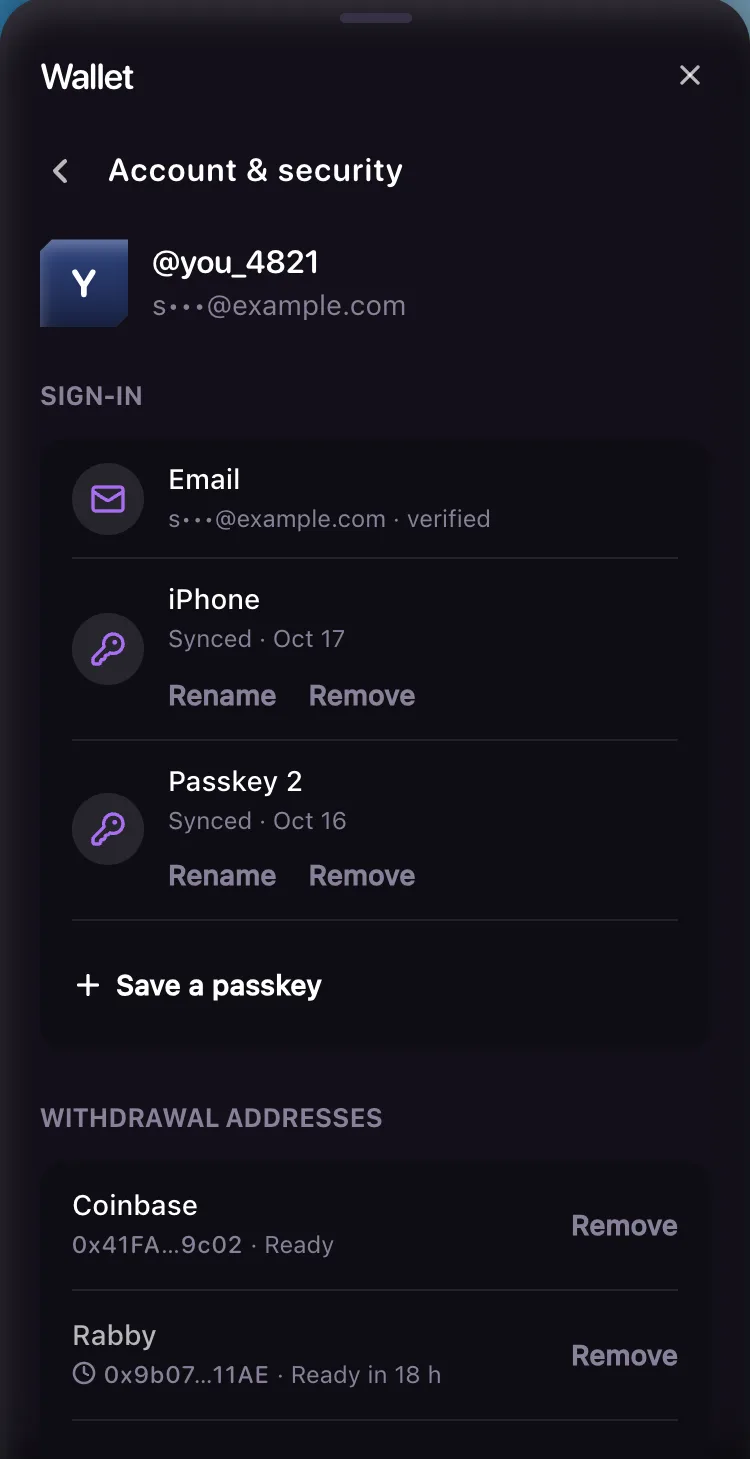
The wallet's Account & security screen: your sign-in email and passkeys, your withdrawal addresses, locking withdrawals, signing out, and This wasn't me.
Account & security is where you look after a signed-in account, from your passkeys to the addresses withdrawals can go to. Open it from the account row at the bottom of the wallet, or from Account & security in the account menu on a computer.
Sign-in
The top of the screen shows your handle and your email, masked, so someone looking over your shoulder sees only its first letter and its domain.
- Email is the address you sign in with. It can't be changed yet.
- Passkeys are listed with their name, whether they sync across your devices ("Synced") or live on one ("This device"), and the day you saved them. Rename changes the name you see here. Remove asks first: "You can't sign in with it after this. New withdrawal addresses will wait 24 hours."
- Save a passkey adds one for this device.
Saving or removing a passkey within 10 minutes of signing in by email or passkey needs nothing more. Later, or after signing in with Google, the wallet asks you to confirm it's you first, with a passkey or an emailed code. Google alone can never add or remove a passkey.
Adding a passkey on a device that didn't create the account, or removing one, counts as a security change: for the next 24 hours no new withdrawal address opens. Removing a passkey also signs your account out on your other devices and cancels any withdrawal address still waiting to open.
Withdrawal addresses
This list is the same one you pick from when you withdraw. Each row shows the name you gave it, the start and end of the address, and Ready, how long it still waits (Ready in 18 h), or Opens after we email you. Withdraw B3 explains adding one and how long the wait is.
Remove asks first, names the address in full, and says what removing it costs: "Adding it back takes a check and a wait of up to 3 days." Any withdrawal still in line to that address comes back to your balance. One Basement has already started sending can't be stopped, and for up to 2 minutes it can still show In line.
Lock withdrawals
Lock withdrawals stops new withdrawals and new withdrawal addresses on your account until you turn them back on, and sends any withdrawal still in line back to your balance, except one Basement has already started sending. Use it if you think someone else might be in your account.
To end it, tap Unlock withdrawals and confirm it's you. Withdrawals unlock 24 hours after that check, not at once.
This wasn't me
Every email about a new withdrawal address, and the banner in the wallet while one is waiting, points here. This wasn't me does four things at once:
- signs your account out on every device,
- removes every withdrawal address added in the last 24 hours, open or waiting, and sends withdrawals still in line back to your balance (one already being sent can't be stopped),
- locks withdrawals for 24 hours,
- and counts as a security change, so no new address opens for the next 24 hours.
Then sign in again on a device you trust, check your passkeys and remove any you don't recognise.
If someone got into your email, take back your email account first (change its password), because Basement's notices go to that inbox. Then tap This wasn't me and contact us even if you can still sign in: with your inbox, someone can link a Google account to your Basement account, and this screen can't show or remove a Google link yet. Basement can.
Sign out
Sign out everywhere is the large button near the end of the screen: it ends your account on every device, which is what stops a sign-in someone else got hold of. Sign out of this device is the last line, and ends only the browser you're using. Either way that browser starts again as a guest, and your B3 and picks stay with your account.
Signing out doesn't remove your withdrawal addresses.
Your B3
Where B3 is live, a short section above Sign out of this device says how Basement holds it: Basement keeps your B3 in its vault on Base, and your deposit address is run by Basement and moves what you send into the vault. There's no key or recovery phrase for you to keep. The vault and reserves has the details.
If withdrawals are on hold
"Withdrawals are on hold for this account." means Basement froze the account, usually after a report that someone else got in. Withdrawals and new addresses wait until it's lifted. Tap Contact support in the banner, or see Contact.