
Share a clip or a link
Share a vertical clip of a round's best moment or a link to the match. What the clip shows, what your friend sees and what's never shared.
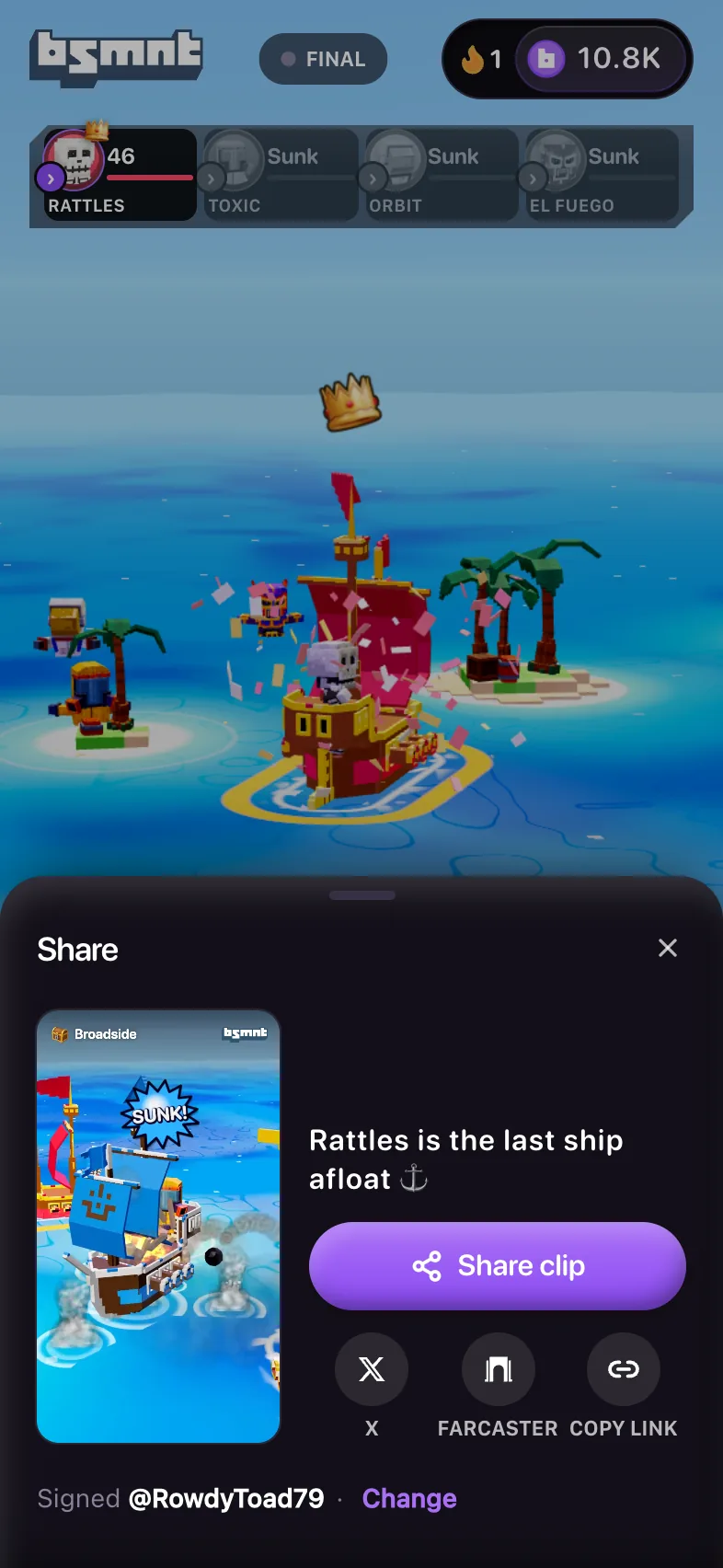
After a round ends, you can share a short vertical clip of the moment it was decided, or a link to the match. Your friend lands on that round and gets a quick way into a pick of their own.
Open the share sheet
The share sheet opens from three places:
- Share clip on the result, after a win
- The share button on other results. After a loss it shows only when your Drop decided the round.
- The share button at the top of a replay
The Share button on the right of a live card sends a link with no clip. On a phone it opens your share sheet. On a computer it copies the link, and so does the S key.
| Button | What it does |
|---|---|
| Share clip | On a phone, opens your share sheet with the video, a line of text and the link. |
| Save clip | On a computer, or a phone that can't share video, downloads the clip and copies the link. You'll see Clip saved · link copied. |
| X | Starts a post on X with the text and the link. |
| Farcaster | Starts a cast with the text and the link. |
| Copy link | Copies the link and shows Link copied. |
X, Farcaster and Copy link work right away, while the main button still reads Making clip.
What's in the clip
The clip is a 9:16 video at 720 by 1280. It covers the 5 to 7 seconds around the moment the round was decided, like the knockout, the last ship sinking, the go-ahead goal or the finish line, then a 1.9-second end card.
Your device makes it by re-running the round from its revealed seed, the same way a replay does. Nothing is recorded from your screen. On most current browsers it's an MP4 with the match sound. Browsers that can't encode it that way record a silent version in real time.
The end card shows the winner, your @handle, the bsmnt wordmark and the link. If the round paid you back more than you put on it, the card leads with Called it and the multiplier with what you're up, like 1.9x · +450. Otherwise it shows who won and how, such as Boo wins in sudden death.
The text that goes with the clip works the same way. It names your call only when it won, like "Called Rattles, last ship afloat, at 3.8x", and otherwise says what happened, like "Rattles is the last ship afloat".
A real-B3 win shows the amount in B3 on the end card. Watch the preview before you post if you'd rather keep that to yourself.
The clip is signed with your handle only. To use a different name, tap Change next to Signed @you, and the clip is made again. See your handle.
If the clip stalls, the sheet says Clip didn't finish and the main button becomes Share link. Close the sheet and open it again to retry. Some rounds can't be filmed, and the sheet says No clip for this round.
What your friend sees
A shared link opens on that round, with your handle at the top. That works whether or not you had a pick in the round: Basement finds you from your pick, your Drop that decided it, or the invite code every link you share carries.
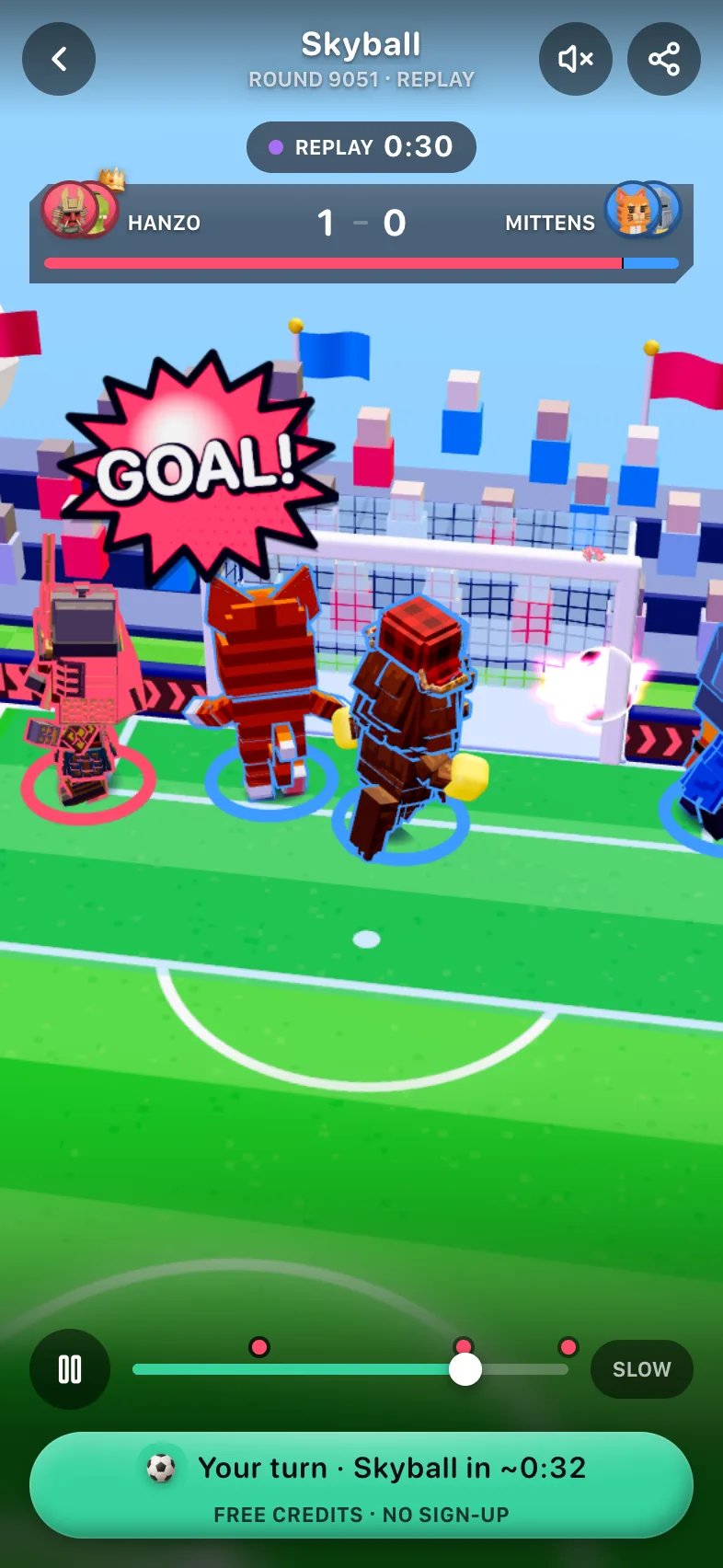
- A finished round opens straight on its replay. The top reads @RowdyCorgi37 called Dojo · 1.9x if your pick won, or @RowdyCorgi37 sent you this otherwise.
- A round still running plays live, with @RowdyCorgi37 sent you this one at the top for four seconds. If your friend misses the finish, Round over · Watch the finish opens the replay.
Your friend never sees an amount or a losing pick. You don't see the banner on your own link.
A shared replay skips ahead to a few seconds before the clip's moment and says Skipped to the good part · From the top. Tapping From the top plays the whole round.
When the replay ends, Your turn takes your friend to a round they can still pick, with a countdown, like Your turn · Skyball in 0:18. Until their first pick it also says Free credits · no sign-up. It heads for the game they just watched when its next round is under 45 seconds away, and otherwise for the soonest round anywhere. On a friend's first visit it goes for a two-sided game, but only one that goes live within 30 seconds. A tap, or six seconds of waiting, opens that match with the picker ready. If your friend had a pick of their own in that round and it lost, they get Watch Skyball live instead, with no countdown.
Link previews in other apps
Pasted into a chat or a post, a link shows a preview card. While the round is open, the card shows the lineup facing off. Once it's over, it shows the winner with a crown and the score. If your Drop decided the round, the card says My drop flipped it. Links and embeds has an example.
In Farcaster and the Base app, a link shows as a card with one button, Pick the winner, Pick the next one or Watch the replay, depending on the round. In their mobile apps, the button opens Basement inside the app, and there the share sheet's main button is Cast it, which opens the app's own composer. Basement can't load inside a frame on a website, so on Farcaster's website open the link itself.
Developers can read more in links and embeds.
What a shared link carries
A shared link looks like https://basement.fun/a/skyball?r=100&s=…&i=….
ris the round number.sis a share code for you and that round only. It changes every round, so on its own it can't link your rounds together.iis your invite code. It's the same on every link you share, so anyone holding several of your links can tell they came from one account.
Neither code carries a login. Anyone with the link can open the round and see what's described above, but nothing in it signs anyone in as you.