
Withdraw B3
Send B3 from your Basement balance to an address you added. The wait on a new address, the minimum, the 24-hour limit, the play-once rule and each status.
A withdrawal sends B3 from your Basement balance to an address you added, on Base. Basement pays the gas, and it usually arrives in about a minute.
Withdrawals only ever go to addresses you've added to your account, and a new address waits before it can receive anything. Real B3 is for adults 18 and over who've accepted the in-app terms, it depends on your region, and every B3 pick is a bet you can lose. If you want a break, withdrawing is one way to take it. See Play responsibly.
Add a withdrawal address first
Add one now, before you need it: a new address takes at least 2 hours to open. After your first deposit, the wallet reminds you: "Add a withdrawal address now so it's ready when you win."
Open Withdraw
Tap your balance, the B3 tab, then Withdraw. Tap Add an address next to To. You can also add one from Account & security.
Paste the address and name it
Paste an address on Base, from an exchange account that takes B3 on Base or a wallet you control. The field checks it as you type: "Looks like a Base address". Give it a name you'll recognise, like Coinbase. Tap Continue.
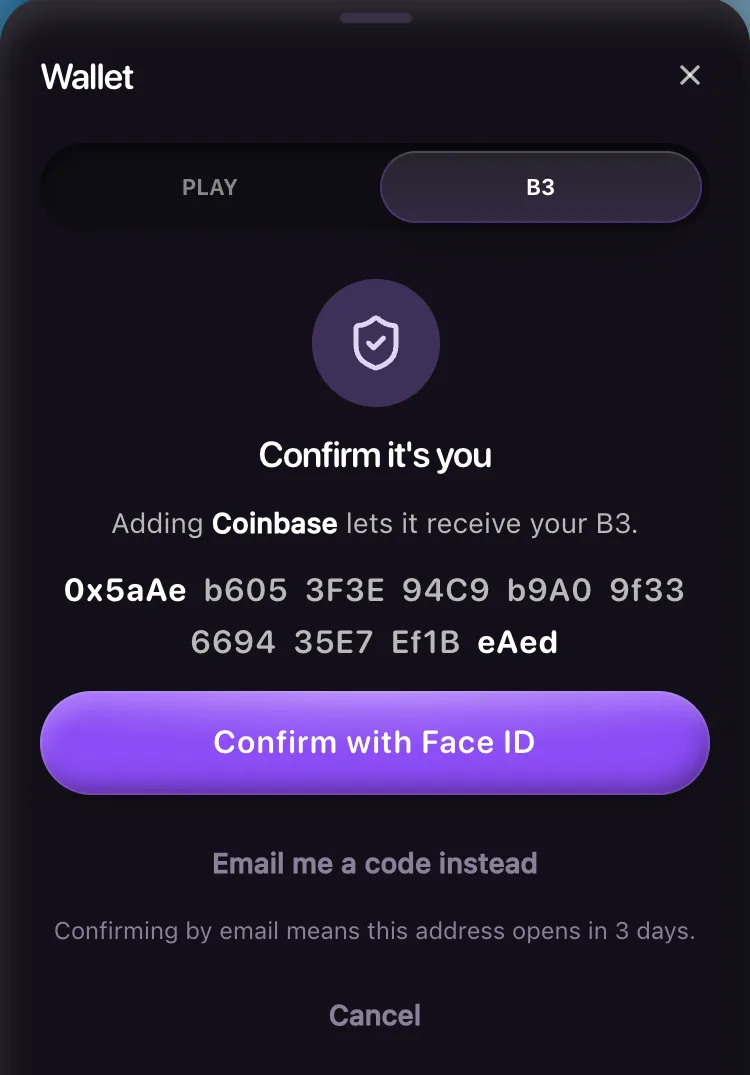
Confirm it's you
The wallet shows the address in full and asks you to confirm with your passkey (Face ID, a fingerprint, your screen lock, or your phone over a QR code), or with a code sent to your email. Check every character before you confirm.
Wait for it to open
Basement emails you "New withdrawal address on your Basement account" with the full address, and notifies your devices if you turned notifications on. The wait starts once one of those goes out. The wallet then says when it opens, like "Coinbase opens at 3:40 PM".
How long a new address waits
| You confirmed with | From | It opens after |
|---|---|---|
| A passkey | the device you created the account on, or one you've been signed in on for a day or more | 2 hours |
| A passkey | a device you signed in on less than a day ago | 24 hours |
| An email code | an account with no passkey | 24 hours |
| An email code | an account that has a passkey | 3 days |
The wait is there so that someone who gets into your email can't add their own address and withdraw at once. While an address waits, the wallet shows a banner with when it opens and Not you?, which leads to Account and security.
After a security change, such as a passkey added on a new device or removed, no address opens until 24 hours after it. A passkey saved in the last 3 days counts as an email code, unless it was your account's first or you saved it on the device you created the account on. Addresses that are already open stay open.
You can add up to 20 addresses. The wallet refuses an address that isn't valid, your own Basement deposit address, or one of Basement's own addresses. It warns you when an address is a contract, or when it starts and ends like one you already added but isn't the same: check every character, because look-alike addresses are a common trick.
Check that it takes B3 on the Base network. Basement can't get back B3 sent to an address that doesn't.
What you can withdraw
You can withdraw your B3 balance minus anything still held by the play-once rule. Every B3 you deposit has to be staked once on a B3 pick or paid B3 Drop before it can leave.
- Each B3 pick and paid B3 Drop counts the moment you place it, win or lose.
- Winnings are never held back. They can leave as soon as they're paid.
- Picks use up deposited B3 first. With 6,000 B3 still to play and 7,600 B3 of winnings, a 2,000 B3 pick leaves 4,000 to play and all 7,600 free to withdraw.
- If a round is voided or a Drop is refunded, its stake comes back and goes back to being held.
While some B3 is held, a line under your wallet balance says how much is left to play, for example "Play 2,000 more B3 to unlock withdrawal". Once some of your balance is free to go, it reads "Play 2,000 more B3 to unlock the rest". Withdraw stays off until at least 1,000 B3 can leave.
Play credits can't be withdrawn. They never become B3.
How to withdraw B3
Open Withdraw
Tap your balance at the top of the screen, the B3 tab, then Withdraw.
Check the amount
It starts at the most you can withdraw right now. Type a smaller amount if you want.
Pick where it goes
To shows an open address by name, with the full address under it. Tap it to pick another. Addresses still waiting show when they open and can't be picked yet.
Send it
Tap the button. It reads Withdraw 5,000 B3, or whatever amount you chose. The note under it says "Arrives in about a minute" and how much you have left today.
Watch Activity
The withdrawal shows as "In line", then "Sending", then the time it landed, with a link to the transaction on Basescan.
Above 25,000 B3, the wallet asks you to confirm it's you, unless you signed in with a passkey or an email code in the last 10 minutes. The check names the amount and the full address, and it confirms only that withdrawal.
Withdrawal limits today
These are settings, so they can change.
| Limit | Today |
|---|---|
| Smallest withdrawal | 1,000 B3 |
| Most per account | 50,000 B3 in any 24 hours |
| Check that it's you | Above 25,000 B3 |
| Withdrawals in line at once, per account | 2 |
| Most in one withdrawal (set by the vault) | 100,000 B3 |
| Vault total for all players | 500,000 B3 a day, refilling over 24 hours |
When your 24-hour limit is used up, the button reads "Daily limit reached" and the note says "Your limit refills over 24 hours".
If the vault's daily total for all players runs out, your withdrawal isn't refused. It waits in line until the total refills. Accounts take turns. If you ask for a second withdrawal within 24 hours of your first, any other player's first withdrawal requested within the next hour goes ahead of it.
When the button won't send
If an amount can't go out, the withdraw button, or the line under it, says why.
You haven't added a withdrawal address yet, or none has finished its wait. See Add a withdrawal address first.
The address you picked was removed. Pick another one.
The amount is under the 1,000 B3 minimum.
The amount is more than what's left of your 24-hour limit. The number is what you can still send.
Part of the amount still has to be played once. The number is what you can send now.
The amount is more than your Basement B3 balance.
You or "This wasn't me" locked withdrawals. To turn them back on, see Account and security.
Basement froze the account. Tap Contact support in the banner.
An account can have 2 withdrawals in line at once. Wait for one to land, or cancel one from Activity.
What each status means
| In Activity | What it means |
|---|---|
| In line | Waiting to be sent. You can still cancel it. |
| Sending | On its way on Base. It can't be cancelled now. |
| A time, like "Just now" | It reached your address. Tap the link icon to see it on Basescan. |
| Returned to your balance | It didn't go out, and the B3 is back in your Basement balance. |
To cancel, tap Cancel on a row that says "In line". The B3 goes straight back and you see "Back in your balance".
If something other than the vault's daily total holds a withdrawal for 24 hours, such as a pause, it's cancelled and shows "Returned to your balance". Removing the address it was going to, locking withdrawals, or "This wasn't me" also brings a withdrawal still in line back to your balance. One Basement has already started sending can't be stopped, and for up to 2 minutes it can still show In line.
Basement charges no withdrawal fee and pays the Base gas itself. The amount you ask for is the amount that arrives.
If you're somewhere B3 is blocked, or B3 is paused
Withdrawals are blocked only in sanctioned places, where you see "Withdrawals aren't available where you are." Anywhere else you can take your B3 out, even if B3 play is off where you are. The wallet then says "B3 games aren't available in your region. You can still withdraw." See Availability.
While B3 is paused, new withdrawals stop with "Withdrawals are paused for a moment. Your balance is safe." Withdrawals already in line wait, and one that's already sending still lands.