
Basement on a computer
On a wide window Basement is a broadcast desk: every arena in a rail, the match on a big stage, and a bet slip that never leaves the screen.
On a computer, Basement lays itself out as a broadcast desk. You get it in any window 1276 pixels wide or more, or from 1000 pixels on a landscape screen such as a tablet on its side. The window also needs to be at least 600 pixels tall. Smaller windows get the phone layout.
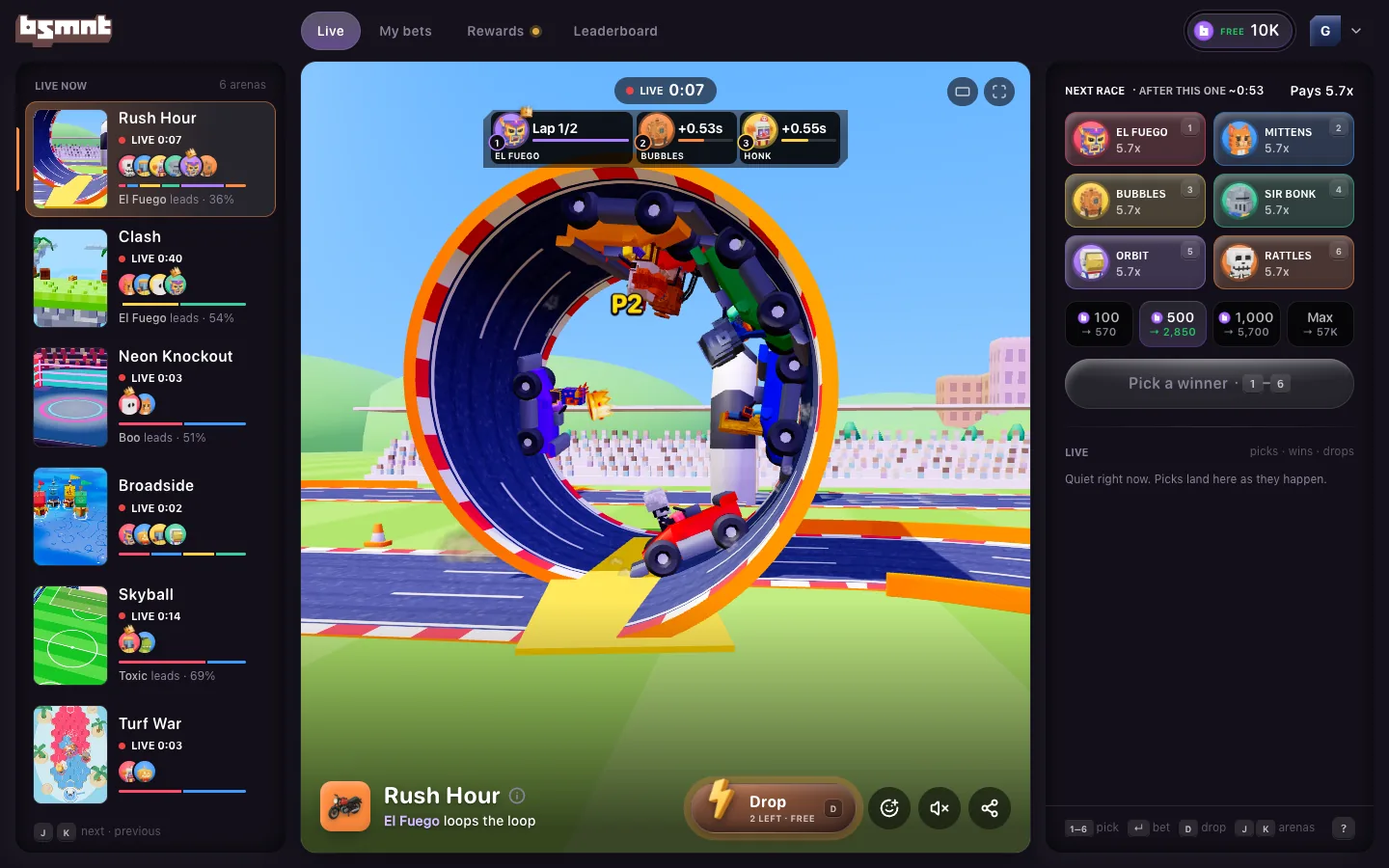
The layout
Three columns sit under one header:
- The arenas rail on the left lists all six games, live.
- The stage in the middle shows the match, as big as the window allows.
- The bet slip on the right has your pick, the next round's sides and stakes, and what's happening elsewhere.
The header has four tabs, your balance and your account button.
| Tab | What it opens |
|---|---|
| Live | Closes whatever panel or replay is open, back to the match |
| My bets | Your last 50 picks. A number on the tab counts the ones still running. |
| Rewards | Your daily refill, invites, streak, free Drops and settings. A gold dot means a refill is waiting. |
| Leaderboard | Today, This week and In a row, plus the Crew tab |
Your balance opens the Wallet, as it does on a phone. The account button, your letter tile with a small arrow, opens a menu with Wallet, Change your name, Invite friends, a Sound switch and Keyboard shortcuts. Install app shows when your browser can install Basement, and Bet with B3 shows once real B3 is switched on. Play credits are free and never turn into B3. Real B3 is for adults 18 and over; how real B3 works covers who can use it.
The arenas rail
Each row is one arena: its poster, its name, where its round is, the faces in it, a bar for each side's chance and one line about the round.
- The status reads Live 0:41, Bets open 0:06, Locked, Next 0:52 or Final. The rail, the slip and Your bets all run on the same clock.
- The line says who leads ("Boo leads · 64%"), what a pick pays and how many people have picked ("Pays 3.8x · 23 picks in"), or who won last.
- A badge on the poster marks an arena where you have a pick on the round the row shows.
Click a row to put that arena on stage. The rows never reorder: Rush Hour, Clash, Neon Knockout, Broadside, Skyball, Turf War. On a desk under 1360 pixels wide the rail shrinks to posters with a short status tag, and resting the mouse on one shows its name.
Move between arenas
- Press J or the down arrow for the next arena, and K or the up arrow for the one before. After Turf War, J goes round to Rush Hour.
- One turn of the mouse wheel over the stage moves one arena. Pinch and Ctrl or ⌘ with the wheel still zoom the page.
- Click a row in the rail.
The desk never moves on by itself. When a match ends, its result stays on stage with the winner, your payoff if your pick won, and Follow. There's no countdown to the next match and no Stay button. Instead the slip points to the next arena taking picks, like Bets open on Broadside · 0:06. Click it, or press N, to go there.
The stage
The pill at the top shows where the round is and its clock, with the scoreboard under it. Once 25 or more people are watching, a viewer count shows in the top left. The two buttons in the top right are Theater and Full screen.
Along the bottom are the game's title and its play-by-play, then the toolbar:
- Drop, with the Drops you have left this round or the price. See how Drops work.
- React opens the five crowd reactions.
- Sound turns sound on and off. It starts off.
- Share copies a link to the round.
Click the ⓘ next to the title for the game's rules, its last 10 winners and its Provably fair panel. On a stage under 720 pixels wide the toolbar stands up the right edge, as on a phone.
Theater (T) takes the arenas rail away so the stage gets its room. Your browser remembers it, and a panel you open in theater brings the column back while it's open. Full screen (F) fills the screen with the stage. Press F or Esc, or click Leave full screen, to come back.
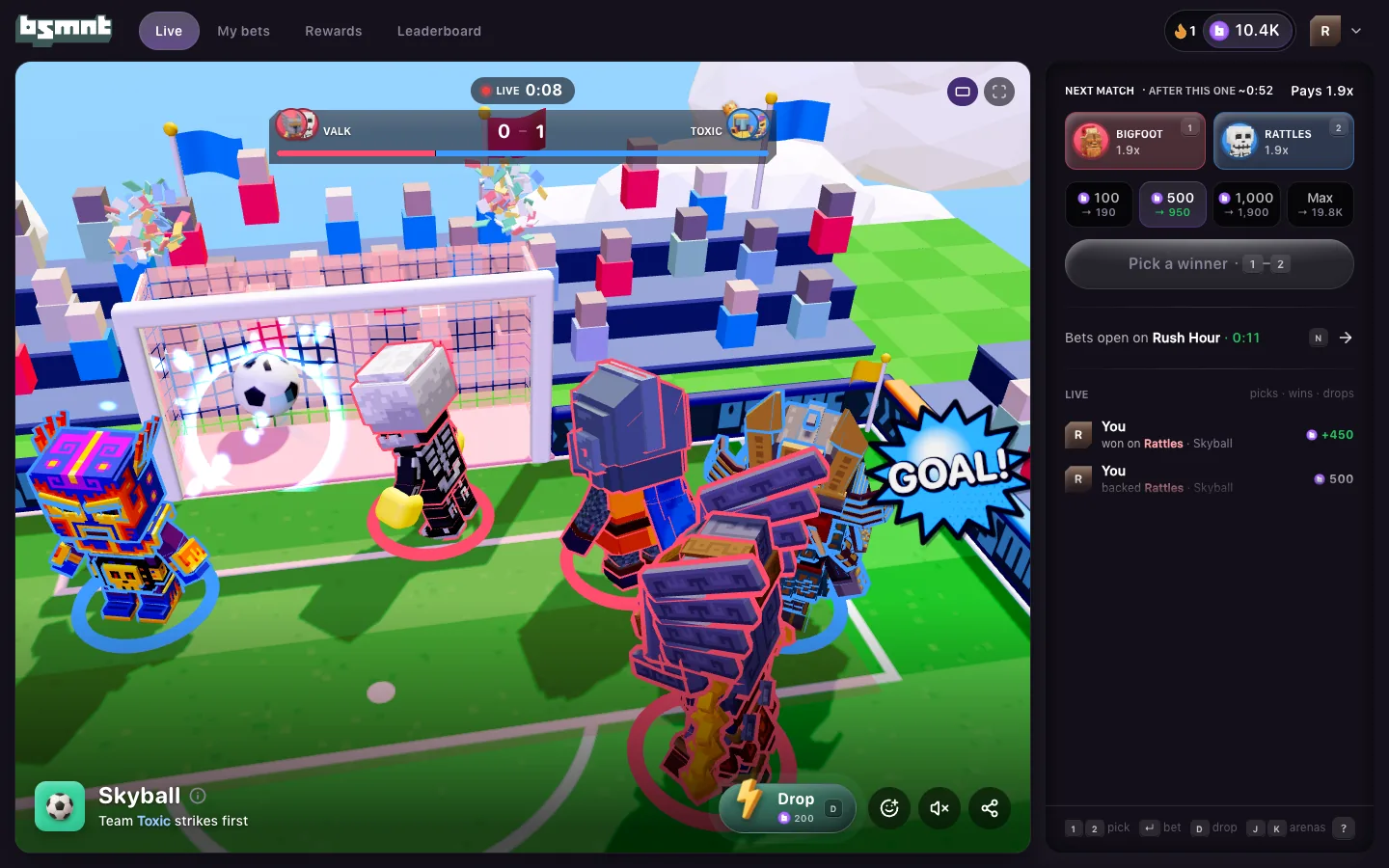
The bet slip
The slip follows the arena on stage, and the bet always comes first.
- The head reads Pick a winner with the time left, or Next race · after this one ~0:53 while a match is live. The word changes with the game.
- Each side shows what it pays and its number key.
- Each stake chip shows what that stake pays back if it wins, like 500 → 2,850.
- Bet 500 on Toxic → 2,850 places the pick. Enter does the same with play credits.
- The line under the button, like "Toxic · 663–3259 in Rush Hour", is that fighter's record in this game. Click it for their sheet.
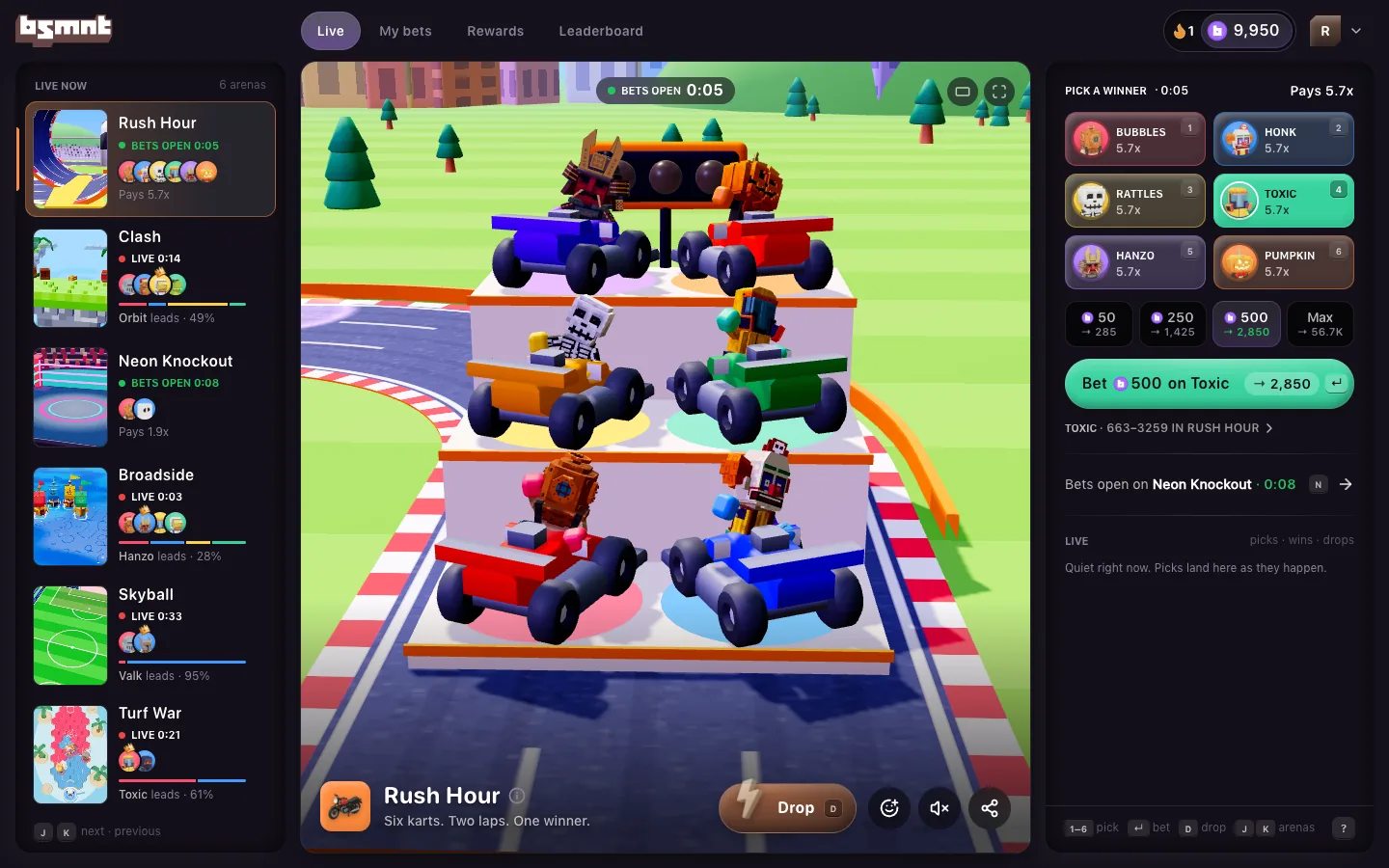
Once you've picked, the slip shows Your pick with your side's live chance and what it pays, like "Riding 500 → 950". While that pick is live, the next round's picker folds to one row of faces and Pick. Click a face to pick that side and open the picker.
Under the bet:
- Bets open on names the next arena taking picks. Click it or press N.
- Your bets lists your picks running in other arenas. When more are running than fit, +2 more in My bets opens the rest.
- The crowd shows how other players split their picks on the round, once at least 3 of them have picked.
- Live shows picks, wins and Drops from across Basement as they happen.
A row of key hints sits at the foot of the slip, showing only the keys that work right now. Click ? for the full list on keyboard shortcuts.
Panels open beside the stage
My bets, Rewards, the Leaderboard, the Wallet, game info, your name and the keyboard list all open in the left column, in place of the arenas rail. The stage and the slip stay put, so you can keep watching and picking. Close a panel with × or Esc. The hint under its title says where Esc takes you, like Esc back to arenas.
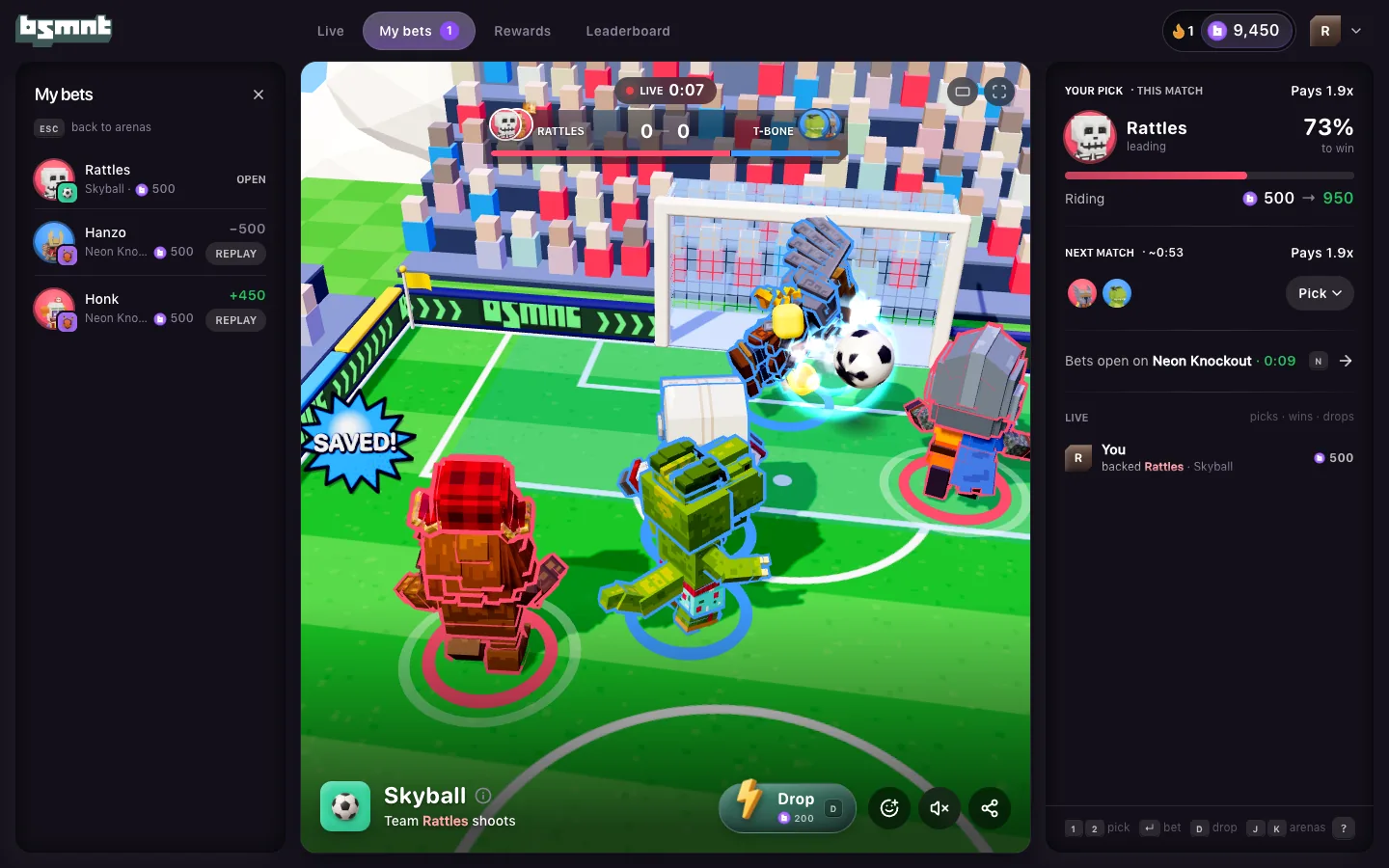
Fighter cards
With a mouse, rest the pointer on a face in the rail, on the scoreboard or in the slip. After a moment a small card shows that fighter's name and record in this game, with Follow and Profile. More on following in the crew.
Replays
A replay plays on the stage, with a panel on the left for its moments and fairness values. See replays on a computer.
Updates
When a new version of Basement is live, a small pill offers New version · Click to refresh. It never reloads the page for you. If an update does need a reload, the desk waits for a result to come up, and never reloads while a panel is open or you're lining up a pick.
With a touch screen
A tablet on its side gets the desk too. Tap a row in the rail to switch arenas. Tooltips, key hints and fighter cards only show with a mouse.