
Deposit B3
Get your own Basement address on Base and send B3 to it from an exchange, a wallet or AnySpend. Whole B3 only, usually in your balance within a minute.
To deposit, you send B3 on Base to your own Basement address. Basement moves it into its vault and adds it to your balance. There's no amount to pick in the app and nothing to confirm: B3 arriving at your address is the deposit. It usually lands within a minute.
Only deposit B3 you can afford to lose. Every B3 pick is a bet, real B3 is for adults 18 and over who've accepted the in-app terms, and it isn't offered in every region. Play credits are separate from B3 and never turn into it. See Play responsibly.
Before you deposit
- You're signed in and have accepted the terms.
- B3 is offered where you are. Where it isn't, the Deposit button doesn't appear. See Availability.
- You have B3 on Base somewhere: an exchange account, a wallet app, or your B3 account at b3.fun. You can also buy some with Buy B3.
How to deposit B3
Open Deposit
Tap your balance at the top of the screen, tap the B3 tab, then tap Deposit.
Get your address
The first time, the screen says "Setting up your address. This happens once." for a few seconds. Then Your Basement address shows in full, in groups of four characters. It's yours alone, and it stays the same each time you open Deposit.
Copy it
Tap Copy address. On a phone the QR button shows it as a QR code; on a computer the QR code shows first.
Send B3 on Base to it
In your exchange, wallet or b3.fun account, send B3 and choose the Base network. Paste your Basement address as the recipient. Copy it from Basement each time, not from your wallet's or exchange's history, and check the whole address before you confirm: look-alike addresses that share the start and end of yours are a common trick.
Watch it land
Back in Basement the deposit shows three steps: Arrived at your address, Moving into your balance, then Ready to play. You can close the wallet meanwhile: it shows the moment your balance goes up, and your picks switch to B3.
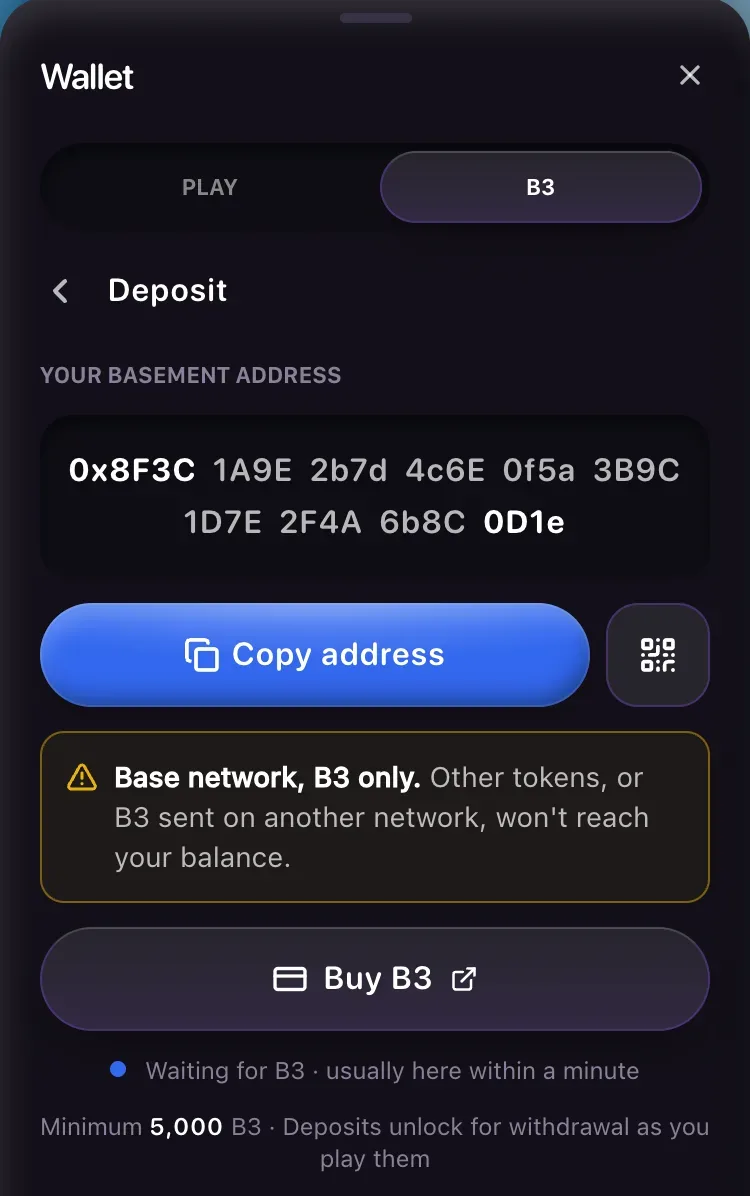
Send only B3, and only on the Base network. Other tokens, or B3 sent on another network, won't reach your balance. ETH sent to the address isn't credited either.
Where the B3 can come from
Withdraw B3 from the exchange, pick the Base network, and paste your Basement address as where it goes. Check first that the exchange sends B3 on Base. The exchange's own wait comes first, then the usual minute.
Send B3 on Base to your Basement address from MetaMask, Coinbase Wallet, Rainbow or your b3.fun account: copy the address in Basement, paste it as the recipient in the other app, confirm, and come back.
Buy B3 copies your address and opens AnySpend with B3 on Base picked. Paste your address as the recipient and pay. Once AnySpend delivers, it lands like any other deposit.
If your browser or the app you opened Basement in has a wallet, a Send from button with that wallet's name appears under the address. Type an amount and confirm in the wallet. Most wallets deposit straight into Basement's vault for your account, usually within seconds. A wallet that can only make a plain transfer sends to your address instead, and then the 5,000 B3 minimum below applies. That wallet pays its own gas, so it needs a little ETH on Base.
How much, and how fast
Basement credits whole B3, and moves B3 from your address into your balance once at least 5,000 B3 is there. Smaller amounts wait at your address and add up. While B3 waits there, the deposit screen says how much, for example "2,400 B3 at your address. It moves into your balance once 5,000 B3 is there, or after 7 days." After 7 days, 250 B3 or more moves anyway when network fees are low. Less than that stays at your address. Any fraction of a B3 always stays.
Most deposits are ready to play within a minute of you sending them, and your very first one can take a few seconds longer. Large deposits, 250,000 B3 or more on their own or with your other recent ones, wait for Base to confirm them: "Large deposits wait for Base to confirm them. Usually under 10 minutes." If a deposit of 5,000 B3 or more hasn't landed after 5 minutes, the screen says "Taking longer than usual", with the amount, and that it moves over by itself. It does, and there's nothing for you to do. A smaller deposit gets the same note after 5 minutes. Under 5,000 B3 that line is wrong: the B3 waits at your address for the minimum, or for the 7-day rule above.
The deposit screen says "Deposits unlock for withdrawal as you play them". Every B3 you deposit has to be staked once on a B3 pick or paid B3 Drop before you can withdraw it. A stake counts whether it wins or loses, and winnings are never held back. Withdraw B3 explains how it's counted.
Your address and the vault
Your Basement address is run by Basement for your account. Only B3 that reaches it on Base, or comes from Send from in the wallet, is credited to you. Basement never asks you to sign anything for it, and there's no key for you to keep.
The bottom of the deposit screen links Basement's vault on Basescan so you can check it. Never send B3 straight to the vault: only your Basement address, or Send from in the app, credits your balance.
B3 sent to the vault address with an ordinary transfer credits nobody and can't be sent back. Send to your Basement address instead, and only B3 on Base.
If a deposit doesn't work
The screen says "Your address is taking longer than usual. B3 can't be sent yet." Wait a minute and open Deposit again. Don't send B3 anywhere until the address shows.
Deposits to Basement addresses aren't switched on where you're playing yet. Play credits work everywhere until then.
Basement limits how many new addresses it makes a day. Try again later. B3 already at an address keeps moving.
B3 is paused for a safety check. B3 you send waits at your address and moves into your balance once the pause ends.
Under 5,000 B3 waits at your address, as above. Over that, it moves by itself, and the screen says so after 5 minutes. If it still isn't there after an hour, report a problem with the Basescan link from the deposit row.
B3 sent on another network, the B3 chain included, doesn't reach your Basement balance. Report a problem with the transaction link. Basement can't promise to get it back.
You declined the confirmation in your wallet after Send from. Nothing moved.
Send from uses your own wallet, which pays its own gas. Add a little ETH on Base to it and try again, or copy your address and send from somewhere else.