
Sign in
Sign in with an email code, a passkey or Google to play with real B3 and keep your account on every device. No password, and your guest account comes with you.
You don't need an account to play with free play credits. Sign in when you want to play with real B3, or when you want the same Basement account on more than one device. There's no password: you sign in with a code sent to your email, a passkey, or Google.
Signing in doesn't commit you to anything. Before your first B3 deposit, pick or Drop, the app asks you to confirm you're 18 or older and accept its terms, and B3 is only offered in some regions (see Availability). A B3 pick is a bet you can lose, so read Play responsibly first.
Why sign in
Real B3 needs it. Deposits, B3 picks, paid B3 Drops and withdrawals all belong to a signed-in account.
It also keeps your account on every device. Sign in on your phone and your laptop and they share one balance, one handle and one pick history.
And it's the only way to get an account back. A guest account lives in one browser. If you clear that browser's cookies or lose the device, the guest account and its play credits are gone for good.
How to sign in
Open sign-in
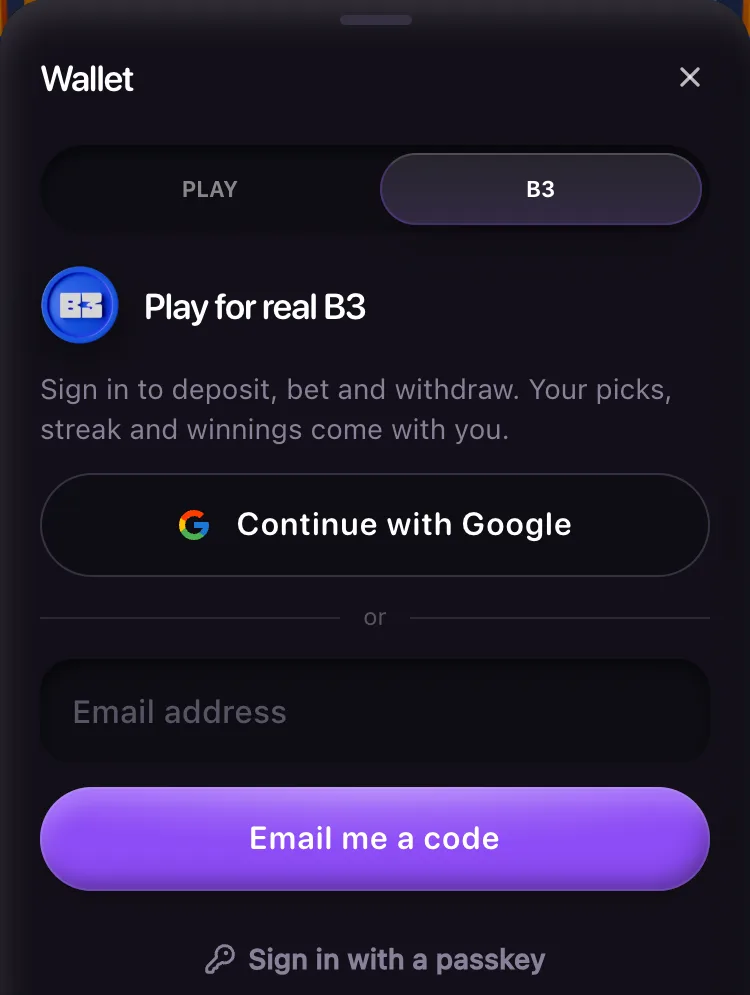
Tap your balance at the top of the screen to open the wallet, then tap the B3 tab, or the Sign in row under your play credits. On a computer, open the account menu at the top right and choose Sign in.
Pick a way in
Tap Continue with Google, type your email and tap Email me a code, or tap Sign in with a passkey if you've saved one. Signing up and signing in are the same step: a new email gets a new account.
Enter the code
For email, the screen says "Enter the 6-digit code we sent to" and a masked version of your address. Type the code from the email "Your Basement sign-in code". It works for 5 minutes and 3 tries. If it isn't in your inbox, check spam or promotions.
Save a passkey, if you like
After a sign-in by email or Google, on a device that can keep a passkey, the wallet offers "Sign in with Face ID next time" (or your fingerprint, Touch ID or Windows Hello). Tap Save a passkey to skip the code next time, or Not now. A passkey also confirms new withdrawal addresses and large withdrawals.
Accept the terms
The first time on the B3 tab, and again whenever the terms change, read the lines under Before you play for B3. Tick I'm 18 or older and accept these terms and tap Continue.
The terms only appear where B3 is offered. Elsewhere you can still sign in, play with credits and keep your account across devices.
If you leave the app to read your email and come back, the wallet goes straight back to the code screen. Asking for the code again within 5 minutes sends the same code, so the one you copied still works.
Where each way works
| Where you open Basement | Passkey | Email code | |
|---|---|---|---|
| Safari, Chrome and other browsers, on a phone or a computer | Yes | Yes, on a device with Face ID, a fingerprint or a screen lock | Yes |
| Basement added to an iPhone's Home Screen | Not yet | Yes | Yes |
| Inside Farcaster, the Base App, or the X, Instagram, Facebook, Telegram or Line in-app browser | No | No | Yes |
Inside those apps the wallet offers Open Basement in your browser, where Google and passkeys work.
What carries over
The first time you sign in, the guest account in that browser becomes your account. Its play credits, picks, history, streak and handle all stay.
When you then sign in on another device, the guest account on that device folds into yours:
- Open picks, pick history and net play-credit winnings move over.
- Its starting play credits and daily refills don't, so a second device can't be used to collect extra credits.
- Days it claimed a refill count toward your streak.
- If your account already chose a handle, it keeps it. If it never did, it takes the handle you chose as a guest. See Choose your handle.
Play credits stay play credits after a sign-in. They never become B3.
How long a sign-in lasts
A sign-in ends 30 days after you signed in, or after 30 days without a visit, whichever comes first. After that, sign in again the same way.
Sign out
Open Account & security: tap the account row at the bottom of the wallet, or Account & security in the account menu on a computer.
- Sign out everywhere signs your account out on every device at once, so a sign-in someone else got hold of ends too.
- Sign out of this device signs out only the browser you're using.
The browser then starts again as a new guest with a new random handle. Your B3, picks and history stay with your account. Sign in again to get them back. Account and security covers the rest of that screen.
If you signed in with a B3 account before
Basement no longer signs in with B3 Global Accounts. Sign in first on the browser you used with B3, and that account becomes yours: its play credits, picks, history and handle stay. One that holds B3 can't become yours this way; contact us for it.
If you already made your account on another device, that browser can't join it, and the sheet says "This browser is signed in to an older B3 account. Sign out to continue." If that older account had B3, or history you want to keep, contact us before you do anything else. If not, tap Sign out of this device under that message: the browser starts again as a guest, and you can sign in. That leaves the older account and its play credits behind, untouched, in case you need support later.
Recovering your account
Basement never gives you a key, a recovery phrase or a password to keep, so there's nothing to export or write down. Your B3 sits in Basement's vault, and your deposit address is run by Basement (The vault and reserves).
- Lost a phone or a passkey? Sign in with an email code or Google, then remove the old passkey in Account & security.
- Lost access to your email? There's no self-service recovery, and you can't change your email yet. Contact us. Basement recovers an account only with proof that existed before you lost the inbox: a passkey saved on the account, or a withdrawal address you confirmed with a passkey, at least 3 days older than the loss. Never on an email or a support message alone. Saving a passkey now is what makes this possible.
If sign-in doesn't work
Check the 6 digits and type them again. Each code allows 3 tries. After that, send a new one.
The code's 3 tries are spent. Tap Send a new code.
A code works for 5 minutes. Tap Send a new code.
Lots of codes went to this email or from this network. Complete the quick check that appears, and the code goes out.
More than 3 codes went to this email from your network in 10 minutes. The message counts down the minutes left, and names a passkey or Google when they're on. A code you already have still works.
10 wrong codes in a day from one browser (or one network) stops guesses there until the day turns (midnight UTC). The message says how many hours are left. Sign in with a passkey or Google if it names them.
Too many codes went to this email today from browsers that have never signed in to it. A browser you've signed in on before still gets codes. Otherwise use a passkey or Google if the message names them, or wait.
Many people on the same Wi-Fi or mobile network are signing in at once. Wait a minute and try again.
The email didn't go out. Try again shortly, or use a passkey or Google if the message names them.
One way of signing in is switched off for a while. The same message names Google or passkeys when it's one of those. Use another way.
New accounts are paused for a while. Existing accounts can still sign in.
Sign-in isn't switched on yet. Your play credits stay on this device and keep working. The sheet only ever shows the ways of signing in that are on.
The Google window closed or came back without signing you in. Tap Continue with Google again, or use a code.
The passkey prompt was closed, or this device has no Basement passkey. Sign in with a code, then save one when the wallet offers it.
This browser is already signed in to a different account. Tap Sign out of this device, then sign in again.
Basement couldn't reach its server. Check your connection and try again.